Remote Control
Warning
The robot’s current walking mode does not include the function for climbing stairs. Please avoid having the robot climb stairs at will to prevent damage to the robot.
Remote Control Parts
The remote controller’s various buttons are explained as shown in the diagram. The functionality of the remote controller mainly consists of left and right joysticks and function buttons.
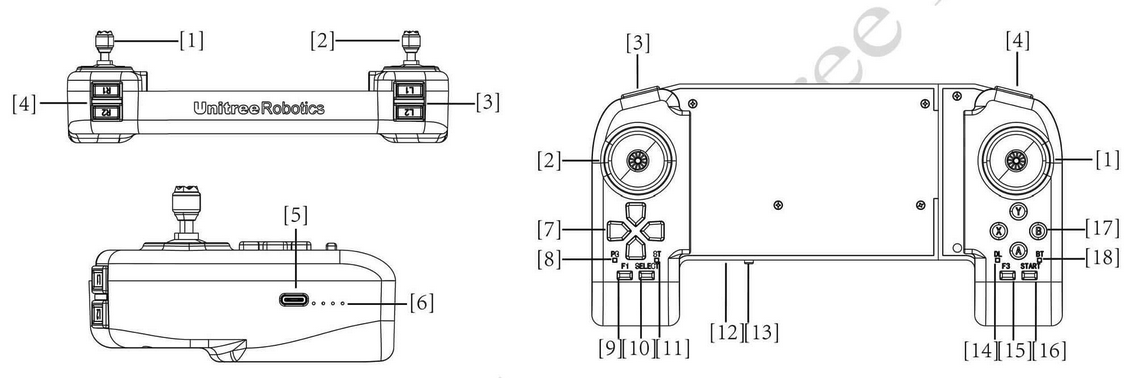
Fig. 51 H1 Remote Control
Fig. 51 shows the parts of the remote control. The parts names as follows:
Right Rocker
Left Rocker
Key L1/L2
Key R1/R2
Type C Charging Interface
Data transmission Signal Light
Left Key
Power Connect Indicator
F1 Left Rocker Calibration Key
SELECT Key
Charging Status Indicator
Power Indicator Light
Power Button
Data Transmission Indicator Light
F3 Right Rocker Calibration Key
START Key
Right Key
Bluetooth Signal Indicator Light
Remote Control Operation
To control the H1, you can use the following commands:
Press
STARTto switch to continuous walking mode.Push the left joystick forward to move H1 forward.
Press
STARTagain to stop H1 and make it stand in place.Press
STARTonce more to return H1 to continuous walking mode.Push the left joystick back to make H1 walk backward.
Push the right stick to the right to rotate H1 in that direction.
Push the right stick to the left to rotate H1 in the opposite direction.
Press
Bto increase the height of the leg lift, and pressAto lower the leg lift.Reattach the rope to the protection hook once H1 remains standing.
Raise the hook until there is tension on the rope supporting H1.
Press
L1+Ato enter damping mode; Now you can safely shut down or enter debug mode.To enter debug mode, press
L2+R2while under suspension. See Fig. 52 for more details.
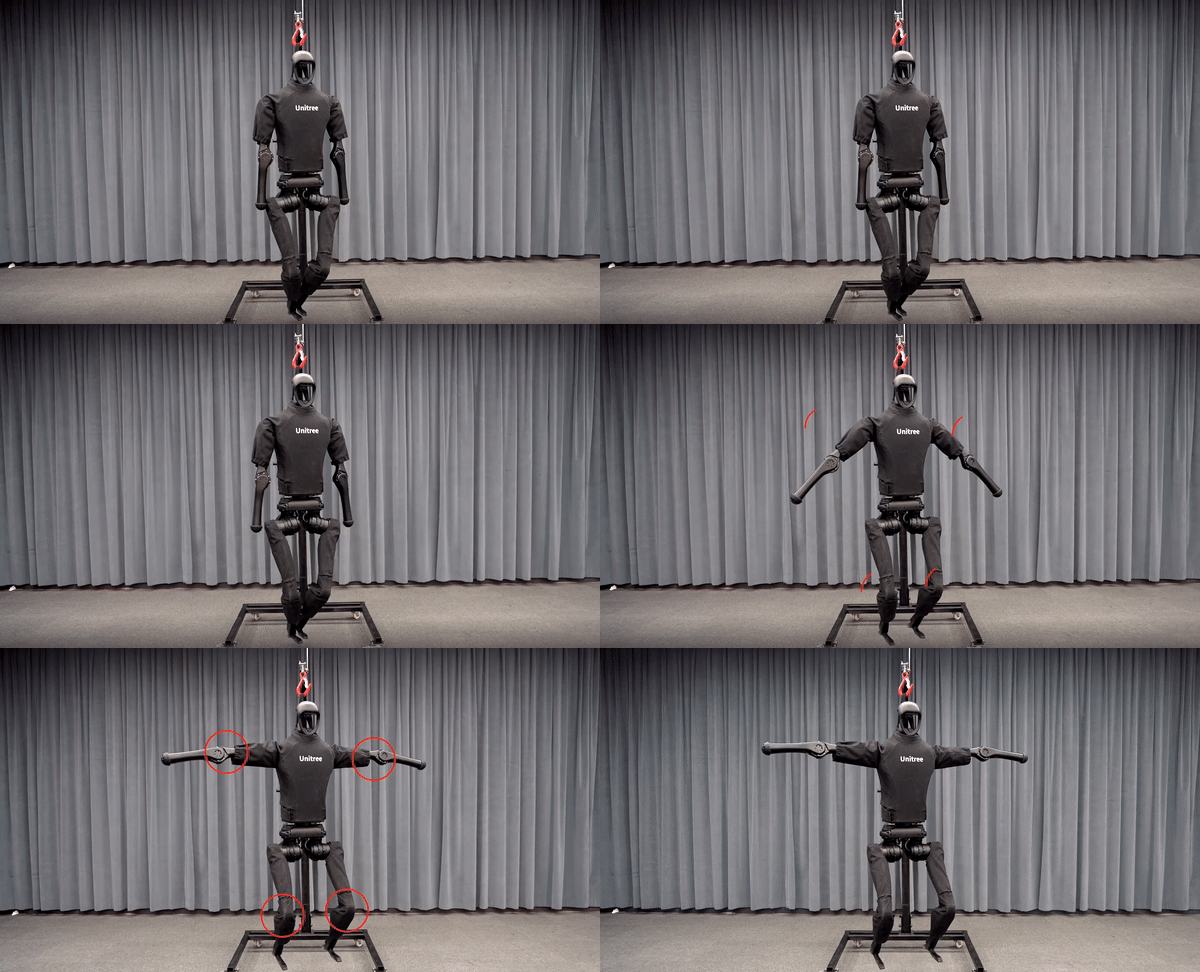
Fig. 52 Unitree H1 debug mode
Press
L2+Bagain to re-enter damping mode and return H1 to its original position.
Operation Guid
Concept |
Description |
|---|---|
Damping state |
All joint motors stop moving immediately |
Damping mode |
The robot is in a damping state and can enter the preparation mode or Develop mode |
Preparatory mode |
The robot will slowly assume the preparatory posture before movement mode within 5 seconds |
Motion mode |
Mode where the robot can be controlled by remote control |
Continuous walking mode |
The robot is always in the stepping state. |
Standing mode |
In this mode, when the joystick command is zero, the robot stops stepping and enters standing; when the joystick command is not zero, or the robot is disturbed and difficult to maintain balance, the robot will start to step. |
Develop mode |
Used for Low-cmd development. When you need to use the SDK for development and debugging, please make sure that H1 has entered Develop mode to stop the support motion control program from sending instructions, so as to avoid potential instruction conflicts. You can confirm whether you have entered Develop mode by pressing |
Mode Switch
Fig. 53 shows the mode switch of the robot.
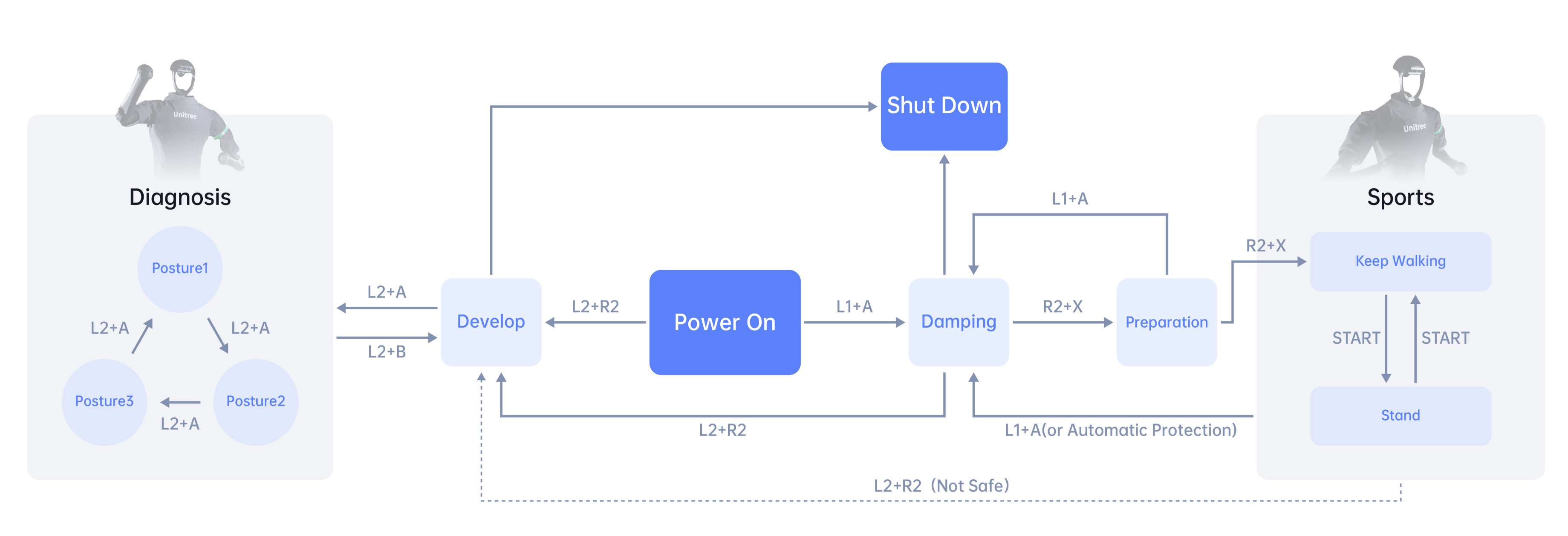
Fig. 53 Unitree H1 remote control
Key Description
Mode |
Button |
Description |
General |
L1 + A |
Enter damping mode |
L2 + R2 |
Enter Develop mode |
|
Damping mode |
R2 + X |
Enter preparation mode |
Preparatory mode |
R2 + X |
Enter sports mode |
Sports mode |
Left joystick |
Translation speed \((v_x, v_y)\) |
Right joystick |
Yaw angular velocity \((w_{yaw})\) |
|
Left cross key |
Speed command compensation |
|
A |
Reduce the height of your feet |
|
B |
Increase foot lift |
|
START |
Switch between continuous walking mode/standing mode |
|
Develop mode |
L2 + A |
Perform position control and control the robot to perform diagnostic actions |
L2 + B |
Stop the diagnostic action and the robot enters the damping state |
Advance Motion
Beyond the basic sports modes, the H1 robot is capable of executing more sophisticated movements. To use these advanced action modes, follow these steps:
Activate the damping mode by pressing
L1 + A.Press the
mode selection keyto enter the preparation state for the desired mode.Press the
mode selection keyonce more to transition into the control state of that mode.
Follow the key logic for further operations within this mode. See Fig. 54 for more details.
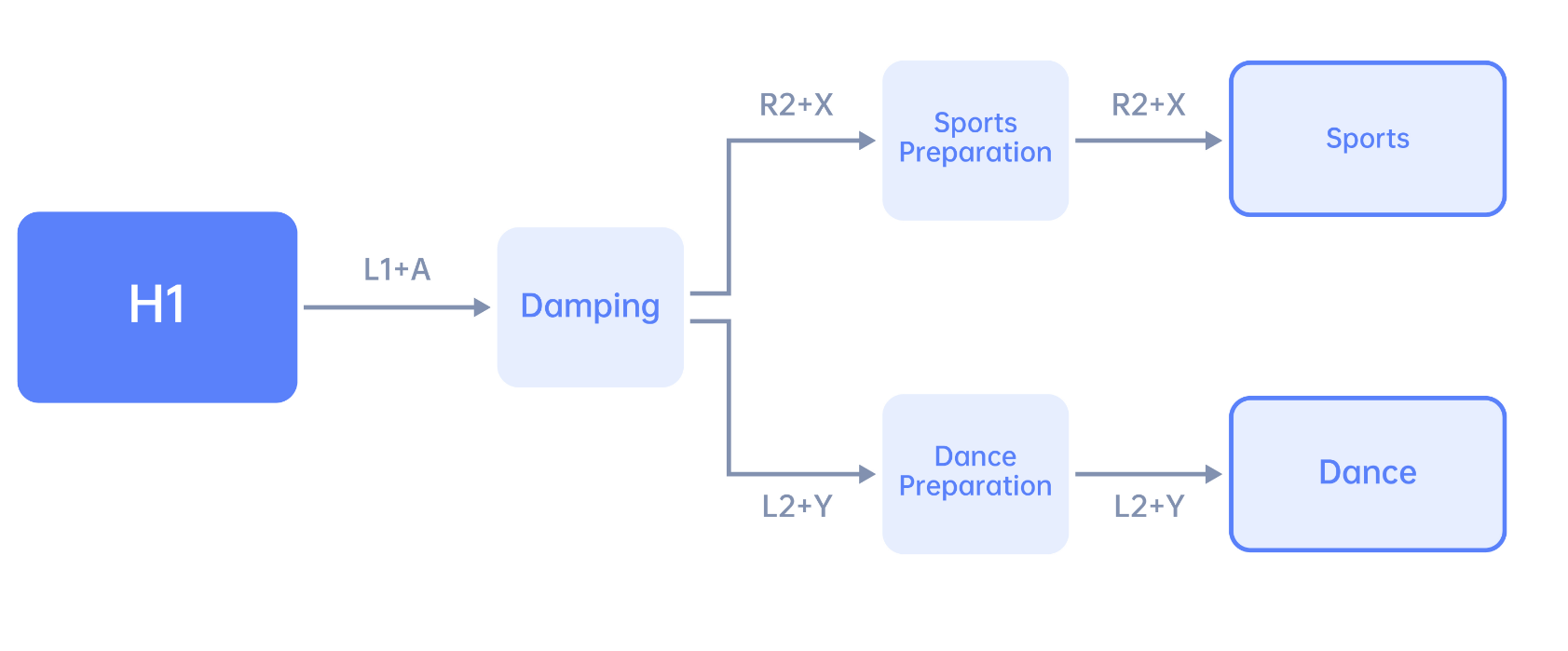
Fig. 54 Unitree H1 advanced motion
Mode |
Mode Selection Key |
Description |
Sport Mode |
R2 + X |
The most commonly used walking action |
Dance Mode |
L2 + Y |
Full body dynamic coordinated dance |
Sports Mode
The sports mode is the most frequently used mode. To activate this mode:
Press
R2 + Xto enter the ready state,Then press
R2 + Xagain to switch to sports mode.
Note
R2 + X is the mode selection button for sports mode.
Dance Mode
The dance mode is a full-body dynamic coordinated dance. To activate this mode:
Put the robot in a suspended state, and use
L1 + Ato enter damping mode.Press
L2 + Yto enter the ready state.Then slowly lower the robot and press
L2 + Yagain to switch to dance mode. The robot will enter the standing state. At this time, you can relax or untie the protective rope.Press
START, and the robot will start a whole-body dynamic and coordinated dance, and enter a standing state after the movement is completed.
Note
After each dance, you can press START again to repeat the action.